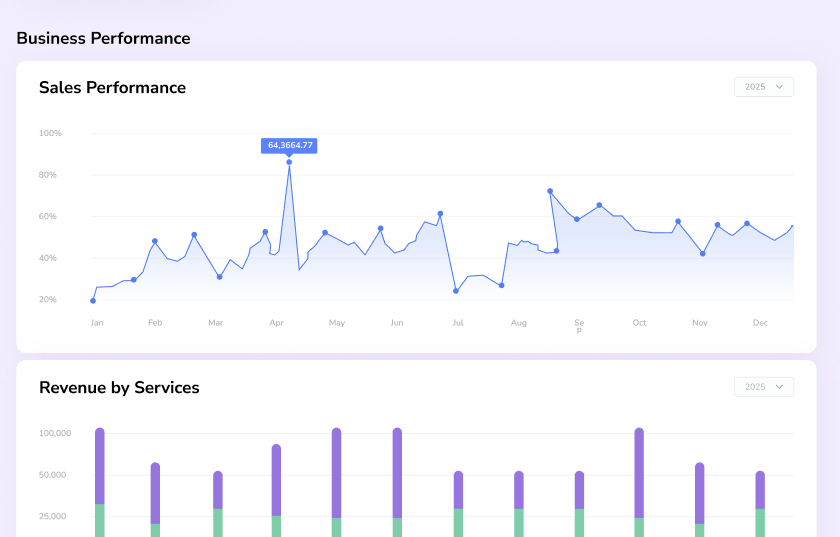
A clinic system for multi-location practices must do more than manage appointments. It needs to unify patient records, centralize reporting, track inventory per branch, and let owners monitor every location from a single dashboard. Most clinic software was designed for solo practices. If you run two or more branches, the wrong choice will create data silos, duplicate work, and blind spots in your operations.
This guide walks you through the unique challenges of chain clinic management, the must-have features to look for, the red flags to avoid, and a practical evaluation framework you can use during your vendor search.
Why Is Multi-Location Clinic Management Different?
A single-branch clinic operates in isolation. The doctor, staff, inventory, and patients all exist in one place. Add a second location and everything changes. Patient records need to be accessible at both branches. Stock levels must be tracked independently yet visible centrally. Revenue reports should break down by branch and roll up into a group view. Staff may rotate between locations.
Many practice owners discover these gaps only after they open their second or third branch. They end up using spreadsheets to reconcile data across branches. They log into separate accounts for each location. They lose visibility into which branch is profitable and which is draining resources.
- Patient visits Branch A on Monday and Branch B on Friday — can both doctors see the same treatment history?
- Your procurement team orders supplies centrally — can they see stock levels at every branch in real time?
- A visiting specialist works at three branches — does commission tracking follow them across locations?
- Your CFO needs a consolidated P&L — does the system generate group-level financial reports?
If your current software cannot answer yes to all four questions, it was not built for multi-location operations.
Must-Have Features for Multi-Location Clinic Software
Not every clinic system handles multi-branch operations well. Here are the non-negotiable features you should demand from any vendor.
Cloud-Based Access from Any Location
On-premise software ties you to a specific computer at a specific branch. A cloud-based clinic system lets you access every location from any device with an internet connection. This is not optional for chain practices. Your management team needs to log in from headquarters, from home, or from any branch without installing local software.
Centralized Dashboard and Reporting
A proper multi-location dashboard shows key metrics across all branches on a single screen. Revenue, patient volume, no-show rates, and appointment utilization should be filterable by branch, date range, and practitioner. Without centralized reporting, you are flying blind.
Role-Based Access Control
Your branch manager should see their own branch data. Your operations director should see all branches. Your doctors should see patient records but not financial reports. Role-based permissions are essential for security and compliance in chain practices. The settings module should allow granular control over who sees what.
Branch-Level vs. Group-Level Settings
Each branch may have different operating hours, service menus, pricing, and tax configurations. Your clinic system should let you configure settings at the branch level while maintaining group-wide defaults. For example, all branches might share the same treatment templates, but Branch A charges a different consultation fee than Branch B.
Inventory Tracking Per Location
Multi-branch inventory management is one of the biggest pain points for chain practices. Your stock and inventory system should track quantities at each branch independently, support inter-branch transfers, and alert you when any location runs low. A single consolidated view should show total stock across all branches.
Commission Tracking for Visiting Practitioners
Many chain practices employ visiting specialists who rotate between branches. Your commission plans feature should track revenue and calculate commissions accurately regardless of which branch the practitioner worked at that day. Manual spreadsheet tracking across multiple locations is error-prone and unsustainable.
Unified Patient Records Across Branches
A patient should not need to re-register when they visit a different branch. Their treatment history, allergies, medications, and billing records should follow them across your entire network. This is fundamental to patient safety and continuity of care.
What Are the Red Flags in Multi-Location Software?
Some vendors claim multi-location support, but their implementation creates more problems than it solves. Watch for these warning signs during your evaluation.
- Per-location pricing that scales badly — if the vendor charges a full subscription fee per branch, costs can double or triple as you grow. Look for group pricing that accounts for multi-location economics.
- No cross-branch patient lookup — if patient data is siloed per branch, you do not have a true multi-location system. You have multiple single-branch systems sharing a brand name.
- Siloed data and separate logins — if you need to log into a different account for each branch, the system was not architected for chain operations.
- No consolidated reporting — branch-level reports are useful, but if you cannot generate a group-wide revenue report in one click, your management team will waste hours in spreadsheets.
- No inter-branch inventory transfers — if you cannot move stock from one branch to another within the system, you will track transfers manually and lose accuracy.
“We trialed three different systems before finding one that actually unified our patient records across branches. Two of them required patients to register separately at each location. That was an immediate dealbreaker.”
— Multi-Branch Clinic Owner, Malaysia
How Should You Evaluate Multi-Location Clinic Software?
A structured evaluation process saves you from choosing a system that looks good in a demo but fails in practice. Use this framework when shortlisting vendors.
Trial Checklist
During your trial period, run through these scenarios with real data from your practice. Do not rely on pre-built demo accounts.
- Create two branches in the system and configure different operating hours, services, and pricing for each.
- Register a patient at Branch A and then look up that patient from Branch B. Verify that the full history is visible.
- Add inventory to Branch A and attempt an inter-branch transfer to Branch B.
- Assign a practitioner to work at both branches on different days. Run a commission report for that practitioner across both locations.
- Generate a group-wide revenue report for the past month. Verify it breaks down by branch and rolls up into a total.
- Set up role-based access so a branch manager can only see their own branch.
Questions to Ask Vendors
- How is multi-location pricing structured? Is it per branch, per user, or a flat group rate?
- Can I add new branches without migrating data or setting up a new account?
- Are patient records unified across all branches by default, or is this an add-on?
- Does the system support inter-branch inventory transfers?
- Can I run consolidated financial reports across all branches?
- Is there a mobile app for owners to monitor all locations remotely?
Owner Oversight on the Go
Multi-location practice owners cannot be at every branch every day. A companion mobile app designed for owners and managers becomes indispensable. The MedicalMetBiz App gives you real-time visibility into revenue, appointments, and operations across all your locations — right from your phone. You can check daily sales, review staff performance, and spot issues before they escalate.
How Does MedicalMet Handle Multi-Location Practices?
MedicalMet supports multi-location operations from a single account. You do not need separate subscriptions for each branch. Patient records are unified across all locations. The centralized dashboard and reporting tools let you monitor every branch from one screen. Inventory tracking is per-location with support for inter-branch transfers.
Commission plans automatically track practitioner earnings across branches. Role-based access control lets you define exactly who sees what at each location. And because MedicalMet is fully cloud-based, your team can access any branch from any device.
- Single account for all branches — no duplicate subscriptions
- Unified patient records across every location
- Branch-level and group-level reporting from a centralized dashboard
- Per-location inventory tracking with inter-branch transfer support
- Commission tracking that follows practitioners across branches
- Role-based access control configurable per branch
- MedicalMetBiz App for remote owner oversight
Multi-Location Evaluation Tip
Always trial the system with at least two branches configured. Single-branch demos hide the limitations that only appear when you add a second location. Test cross-branch patient lookup, consolidated reporting, and inter-branch inventory transfers before you commit.
Choosing the right clinic system for a multi-location practice is a decision that affects every branch, every practitioner, and every patient in your network. Take the time to evaluate thoroughly. Use the checklist and questions above. And make sure the system was built for chain operations from the ground up — not retrofitted as an afterthought.

Cedric Lau
Business Development Manager, MedicalMet